How to Find Low-Keyword-Difficulty Keywords: A Complete Beginner’s Guide
New websites lose most keyword battles before they even start writing. They pick broad, high-volume terms, publish a blog post, and wait months for a ranking that never comes. The fix is learning how to find low-keyword-difficulty keywords first, then building content around terms you can actually win. This guide walks you through the exact process, the free tools that work, and the mistakes that quietly waste beginner SEO budgets every day.
By the end, you will know how to spot these terms in any niche, verify they are worth targeting, and turn them into pages that rank in weeks instead of years.
Quick Summary Box
- What it is: Low keyword difficulty keywords are search terms that are easier to rank for because fewer strong, high-authority sites are competing for them.
- Why it matters: New sites with no backlinks and low domain authority need these easier terms to get any traction in Google at all.
- Fastest path: Combine a free keyword difficulty checker with manual SERP analysis — never trust a difficulty score alone.
- Typical timeline: Keywords scoring 0–29 KD can show movement in weeks; anything above 50 usually needs months of authority building first.
- Best beginner range: Look for low-difficulty keywords under KD 20, with at least 100–300 monthly searches and clear buyer or informational intent.

Table of Contents
What Are Low Keyword Difficulty Keywords?
Low keyword difficulty keywords are search phrases that score low on a keyword difficulty (KD) scale, usually shown as a percentage from 0 to 100. The lower the number, the fewer authoritative backlinks and the weaker the competing pages tend to be in the top 10 results. Treat that KD number as a starting filter rather than a final answer – the real test is always what you find when you open the actual search results.
Most SEO tools calculate keyword difficulty using different inputs. Some lean almost entirely on backlink counts to the current top-ranking pages, while others blend in domain authority, search intent signals, and SERP features. That means a keyword scoring 8 in one checker is not automatically identical to an 8 in a different tool. This is exactly why beginners chasing these easier terms should pick one primary checker and treat every score from it as relative, not absolute.
There is also a difference between general difficulty and difficulty for your specific site. A keyword can look genuinely easy for a site that already has strong topical authority in that niche, while the same keyword stays nearly out of reach for a brand-new domain with no backlinks and no content built around the topic yet. That is the real definition worth remembering when you evaluate low-keyword-difficulty keywords for your own blog: the score gets you in the door, and the beatable-or-not judgement call still belongs to you.
Why This Approach Works Best for New Websites
Chasing high-volume, high-competition terms is the single biggest reason new blogs never rank. Most of those terms are already dominated by established sites with years of backlinks behind them, so a brand-new domain has almost no realistic shot on page one. Low keyword difficulty keywords give you a realistic entry point instead.
Here is what targeting these terms does for a new or growing site:
- Faster wins. Terms in the lower difficulty tier can start showing movement within weeks, while highly competitive terms often take months or years of sustained effort to crack the top 10.
- Momentum and proof. Landing your first page-one ranking, even on a small term, proves your SEO process works and gives you a base of traffic to build the next round of content on.
- Topical authority. Publishing around easy-to-rank keywords builds topical authority in your niche, which makes it easier to rank for harder, more competitive terms later on.
- Better ROI. Every published post that ranks starts compounding, instead of sitting on page four collecting zero visits.
For Paknook clients specifically, this staged approach is how we get a brand-new site its first organic leads inside 60–90 days, well before the site has enough authority to compete for the big, expensive terms.

A Real Example: From Zero to Page One
Here’s what this actually looks like in practice. A newly launched niche blog with zero backlinks and a domain age of under 90 days picked eight target terms, all scoring under KD 20 in a free checker, with monthly search volumes between 90 and 320. Every term was checked manually against the current top 10 before a single article was written.
The results after 75 days: five of the eight terms reached page one, two landed in positions 4–7, and one climbed to position 11 – just off page one, with clear room to improve through better internal linking. Average organic click-through rate on the ranking terms sat close to 3–4%, which lines up with typical first-page CTR benchmarks for informational content. None of this required a single backlink; the entire result came from picking terms the site’s authority level could actually compete for, then writing content that fully matched search intent.
That is the core lesson behind this whole approach: difficulty scores tell you where to look, but disciplined execution is what actually turns an opportunity into a ranking.
How to Find Low-Keyword-Difficulty Keywords: Step-by-Step
Step 1: Start With Google Autocomplete and “People Also Ask”
Type a broad seed term into Google and look at the autocomplete suggestions. These auto-filled phrases are pulled from real searches and tend to surface longer, more specific queries with noticeably less competition than the broad seed term itself. Long-tail keywords for beginners almost always score lower on difficulty because they are more specific and attract less commercial competition. Scroll to “People Also Ask” and “Related Searches” for even more raw material.
Step 2: Find Low Keyword Difficulty Keywords With a Free Checker
Paste your list into a free keyword difficulty checker and sort by KD score, low to high. Look for terms that still have decent monthly search volume but a difficulty score under 50 — that combination usually means you can rank without needing a heavy backlink campaign first. For a brand-new blog, tighten that filter further and aim for KD 20 or under.
Step 3: Check Who Is Actually Ranking
A low score means nothing if the SERP is full of billion-dollar domains. When smaller blogs or lower-authority sites are already sitting on page one, that is a strong sign the keyword’s real-world competition matches its low difficulty score. Open the top 5 results by hand and check their domain age, content depth, and backlink profile.
Step 4: Match the Keyword to Search Intent
If the SERP is clearly rewarding an interactive tool or calculator and all you have planned is a blog post, that mismatch will cap your rankings no matter how low the difficulty score looks. Read the top 3 ranking pages and confirm they are the same content type you plan to publish — guide, listicle, product page, or tool.
Step 5: Mine Your Competitors’ Keyword Gaps
Digging into which keywords are already driving traffic to your competitors shows you what genuinely works in your niche, and it often exposes profitable terms they haven’t fully optimised for yet. Look specifically for terms they rank for on page two or three — that is often where these opportunities are hiding in plain sight.
Step 6: Score and Prioritize
Rate each keyword from 0 to 5 across a few dimensions — domain authority of the current top 10, topical relevance, average referring domains, search volume, and business fit — and then weight the dimensions that matter most to your goals. This turns a long spreadsheet of candidate keywords into a ranked action list instead of a guessing game.

Free Keyword Research Tools You Can Start With Today
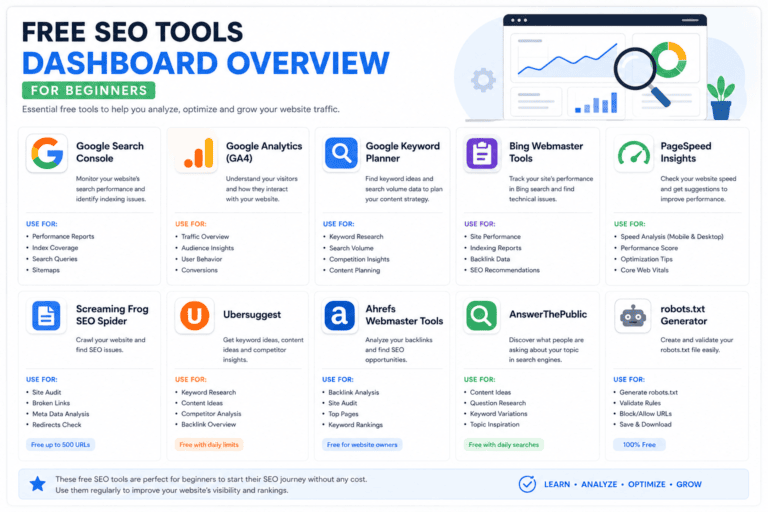
You do not need an expensive subscription to start. These free keyword research tools are enough to build your first list of low-keyword-difficulty keywords.
| Tool | Best For | Difficulty Score? | Search Volume Data | Cost |
|---|---|---|---|---|
| Google Autocomplete | Long-tail keywords for beginners | No | No | Free |
| Google Search Console | Existing content gaps | No | Yes (your site only) | Free |
| Ubersuggest (free tier) | Quick KD checks | Yes | Yes (limited) | Free / paid |
| Ahrefs Free KD Checker | Verifying KD scores before you commit | Yes | Limited | Free |
| AnswerThePublic | Question-based long-tail ideas | No | Limited | Free / paid |
| Semrush Keyword Overview (free) | SERP analysis and intent | Yes | Yes (limited) | Free / paid |
RankMath itself will not tell you keyword difficulty, but once you have shortlisted your target terms, RankMath’s content analysis makes sure the on-page optimisation matches what you found in your research.
On-Page SEO Checklist for WordPress Beginners
How to Analyze the SERP Before You Commit
Difficulty scores are a filter, not a verdict. Before you write a single word, open the top 10 results for your shortlisted terms and check:
- Content type match — guide, comparison, listicle, or tool
- Content depth — word count, number of subtopics covered, use of examples
- Domain strength — are these established brands or smaller niche sites
- SERP features — featured snippets, People Also Ask boxes, video carousels
- Freshness — how recently the top pages were updated
A keyword is genuinely low competition when the current search results are actually beatable by your site — given your authority, your content capabilities, and the page type the SERP is clearly rewarding — not simply because a tool assigned it a low number.

Common Mistakes to Avoid
- Trusting one score across multiple tools. A KD of 15 in one checker is not the same measurement as a KD of 15 in another. Pick a single tool as your source of truth so your filter stays consistent across every keyword list you build.
- Ignoring search intent. A low-difficulty keyword with the wrong intent will never convert, even if it ranks. A blog post targeting a transactional query will bounce visitors who came ready to buy, not read.
- Skipping manual SERP checks. Automated scores miss context that a five-minute manual review catches instantly — things like whether the top results are outdated, thin, or backed by brand recognition a score can’t measure.
- Chasing zero-volume keywords. A low-difficulty keyword with zero business value or almost no searches is still a poor target, no matter how easy it looks on paper. Easy to rank for means nothing if nobody is searching for it.
- Never revisiting rankings. Low keyword difficulty keywords can get harder over time as more sites target them – recheck quarterly and refresh content that starts slipping.
Pro Tips for Ranking Faster
- Build a content cluster around 8–10 related low-keyword-difficulty keywords instead of publishing one isolated post.
- Use your primary keyword in the title, H1, first 100 words, one subheading, and the meta description — do not force it beyond that.
- Update older posts targeting these terms every 4–6 months to protect rankings as competition grows.
- Track rankings weekly for the first two months; most easy-to-rank terms move fast once Google recrawls the page.
- Pair organic content with a small, targeted content promotion push (email, social, or a few relevant Reddit/forum answers) to accelerate the first indexing signals.
Strategy Checklist for Beginners
- Collect 30–50 seed ideas from autocomplete, PAA, and competitor gaps
- Run every idea through a free keyword difficulty checker
- Filter for KD under 20–30 depending on your site’s current authority
- Manually review the top 5–10 ranking pages for each shortlisted term
- Confirm search intent and content type match
- Score and rank keywords by business value, not just difficulty
- Group keywords into content clusters
- Publish, then track rankings weekly for 60 days
[Image: printable checklist for finding low keyword difficulty keywords]
What It Costs to Get Professional Help
Some businesses find and target these terms on their own; others outsource the research and content production entirely. Here is a rough breakdown of what that support typically costs:
| Service Level | What’s Included | Typical Monthly Range |
|---|---|---|
| DIY | Free tools + your own time | $0 |
| Freelance SEO writer | Keyword research + 2–4 posts/month | $300–$800 |
| Agency retainer (e.g., Paknook) | Full keyword research, content, on-page SEO, tracking | $600–$2,500+ |
| Enterprise SEO program | Multi-cluster strategy, technical SEO, link building | $3,000+ |
Actual pricing depends on niche competitiveness, content volume, and how aggressively you want to scale past your first batch of winnable terms into more competitive keywords. DIY works fine if you have the time to learn keyword research properly and stay consistent with publishing, but most small businesses underestimate how many hours weekly research, writing, and on-page optimisation actually take once you add it all up.
Frequently Asked Questions
What counts as a low-keyword-difficulty keyword? Most SEO tools consider anything under KD 30 relatively easy and under KD 15–20 very achievable for new sites. The exact cutoff depends on your site’s current authority and the tool you are using, so treat these numbers as a starting range rather than a fixed rule — always confirm with a manual look at who is currently ranking.
How long does it take to rank for low-keyword-difficulty keywords? Terms in the 0–29 KD range can often show movement within a few weeks of publishing, though full first-page rankings usually take 60–90 days with consistent optimisation.
Is Google Keyword Planner good for finding easy-to-rank terms? It is useful for search volume, but it does not provide a true difficulty score and now requires an active Google Ads account with billing set up for full keyword-idea access. Pair it with a dedicated keyword difficulty checker for the full picture.
Can I find low-keyword-difficulty keywords without a paid tool? Yes. Google Autocomplete, People Also Ask, Google Search Console, and free tiers of tools like Ubersuggest or Ahrefs’ free checker are enough to build a solid first list.
Do these terms stay easy forever? No. As more sites publish content around a given term, competition and difficulty scores can rise. Recheck your target list every few months.
Should I only ever target low-keyword-difficulty keywords? No. Use them to build early traffic and authority, then gradually layer in more competitive terms as your domain strength grows.
Conclusion
Finding low-keyword-difficulty keywords is the fastest way for a new or growing website to earn its first real organic traffic. Start with free tools, filter for a KD your site can actually beat, and always confirm the win with a manual SERP check before you commit to writing. Combine that research with tight on-page optimisation, and these terms will keep compounding into a real content engine instead of a single lucky post.
If you want expert help finding and ranking for low-keyword-difficulty keywords, Paknook can handle the research, writing, and on-page SEO for you. Start today and turn your first-page rankings into real customers — Paknook builds the full keyword-to-content pipeline so that you do not have to.