
15 Best Free SEO Tools for Beginners (Tested in 2026)
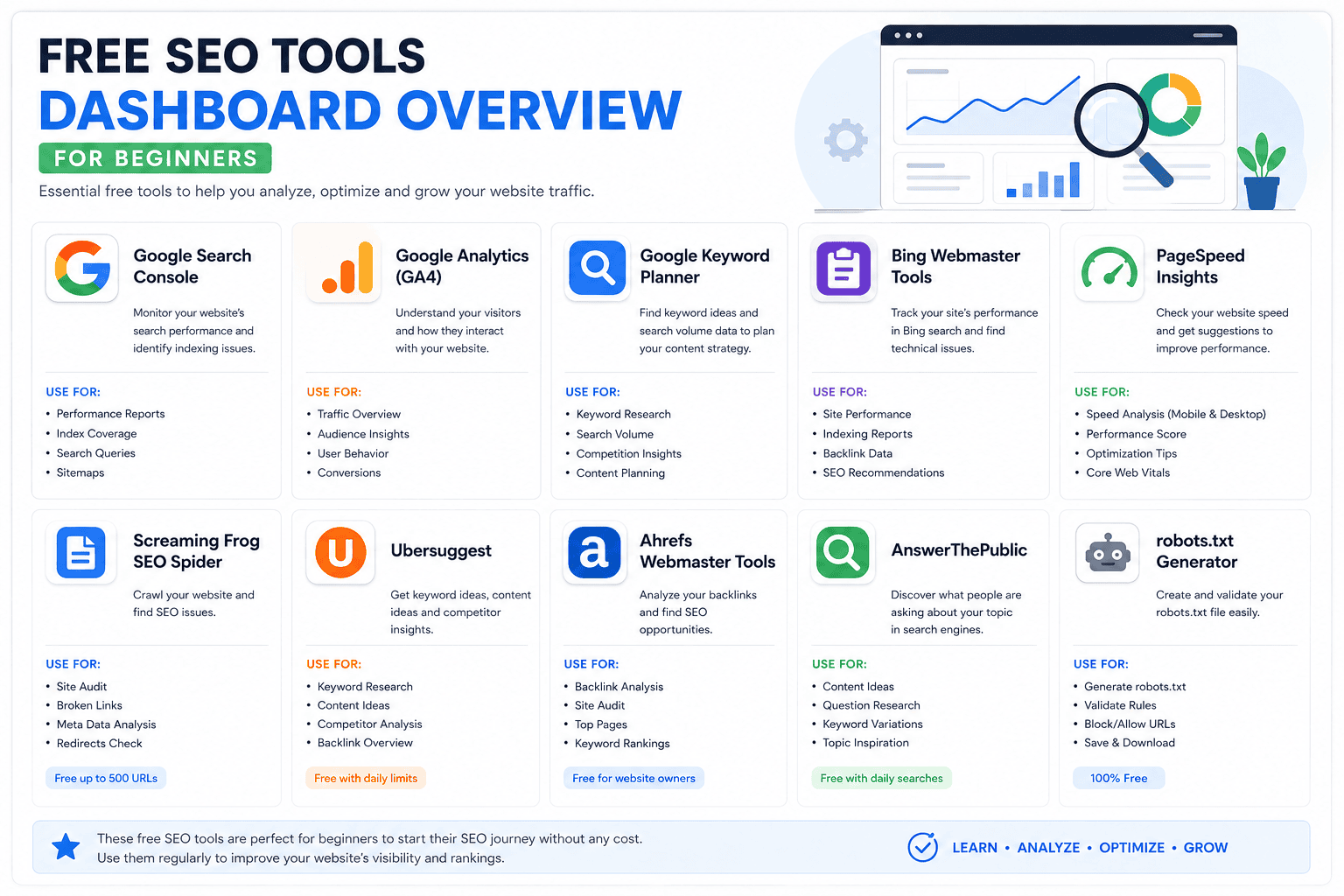
If you’re just starting out, the 15 best free SEO tools for beginners can get you ranking on Google without spending a single rupee on software. I’ve tested every tool on this list myself — on real Paknook client sites — and picked only the ones that actually move the needle for a beginner working with zero budget. Here’s exactly what to use, in what order, and why.
Quick Summary Box
- ✅ All 15 tools are 100% free (no credit card required)
- ✅ Covers keyword research, technical SEO, backlinks, content, and rank tracking
- ✅ Beginner-friendly — no coding or agency experience needed
- ✅ Built for WordPress sites, blogs, and small business websites
Table of Contents
Why Free SEO Tools for Beginners Are Enough to Start
You don’t need a $200/month subscription to rank a new blog. Google’s own free tools — Search Console, Keyword Planner, and Trends — already give you real search data straight from the source, not estimates. Most of the top-ranking guides on this exact topic agree: beginners who master three or four free tools deeply outperform beginners who dabble in ten paid ones. The goal of any beginner SEO tools stack is coverage across five areas: keyword research, technical health, on-page optimisation, backlinks, and content planning. This list covers all five.
1–3: Google’s Free SEO Toolkit (Start Here)
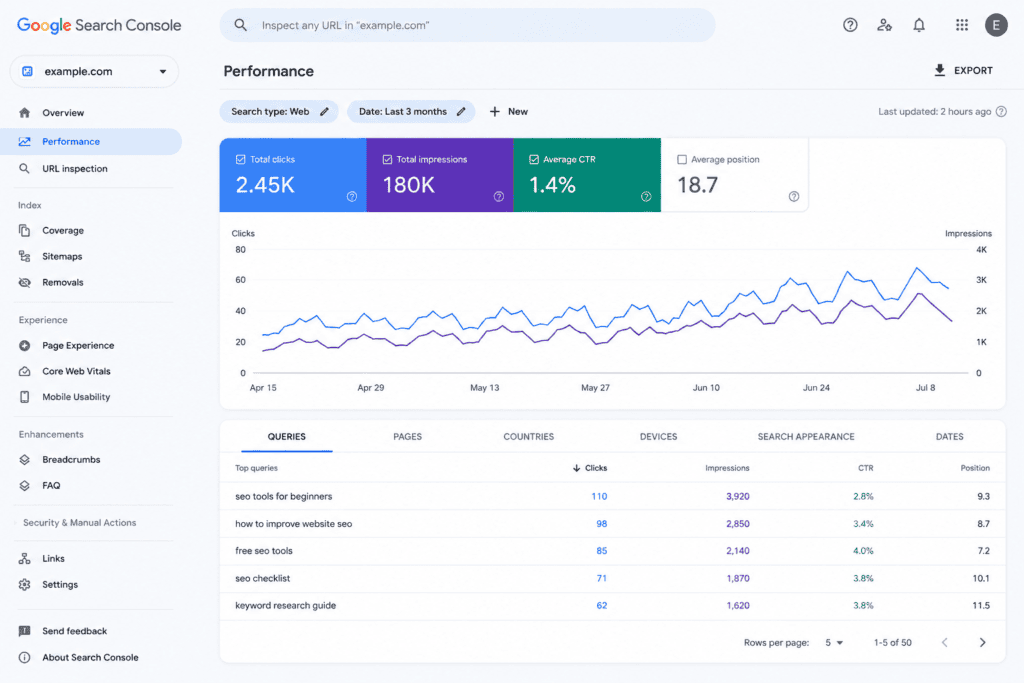
1. Google Search Console — The single most important tool on this list. It shows exactly which queries bring impressions and clicks, which pages are indexed, and which have crawl errors. Setup takes about 10 minutes, and the data is unlimited for verified sites.
2. Google Keyword Planner — Free inside a Google Ads account (no ad spend required). It pulls keyword volume and forecasts straight from Google’s own search data, making it more reliable than third-party estimators.
3. Google Trends — Useful for spotting seasonal spikes and comparing interest between two keyword ideas before you commit hours to writing.
4–6: Technical SEO Audit Tools
4. Ahrefs Webmaster Tools — Free forever, no trial trap. Checks 170+ technical SEO factors on your own domain and gives a full backlink index for your site (competitor analysis is paid-only).
5. Sistrix Smart — A beginner-friendly free auditor that crawls up to 1,000 pages weekly and explains each issue in plain language, which makes it easier to learn as you fix.
6. Screaming Frog SEO Spider — A desktop crawler (free up to 500 URLs) for beginners who want to go deeper on broken links, duplicate titles, and redirect chains.
7–9: Keyword & Content Research Tools
7. Answer ThePublic — Turns one seed keyword into a visual map of real questions, comparisons, and prepositions people search for. Perfect for building FAQ sections and heading structures.
8. Ubersuggest — Free-tier domain overview shows estimated organic traffic and top pages for any competitor URL, capped at 3 searches per day.
9. Google’s “People Also Ask” + Autocomplete — Free, instant, and often the fastest way to find long-tail keywords with real search intent behind them.
10–12: On-Page & WordPress Plugins
10. RankMath (Free Plan) — The on-page checklist tool most WordPress SEOs (including Paknook) use daily: keyword density, readability, schema markup, and internal linking suggestions are built right into the editor.
11. Yoast SEO (Free Plan) — A solid alternative to RankMath with a simpler traffic-light scoring system, good for absolute beginners.
12. Google PageSpeed Insights — Free page-speed and Core Web Vitals report. Fast-loading pages consistently outrank slower competitors of similar content quality.
13–15: Rank Tracking & AI Visibility
13. Nightwatch’s free research tool — Lightweight SERP simulation and keyword research without a paid plan.
14. Bing Webmaster Tools — Free indexing and keyword data for Bing, which also powers a meaningful share of AI answer engines.
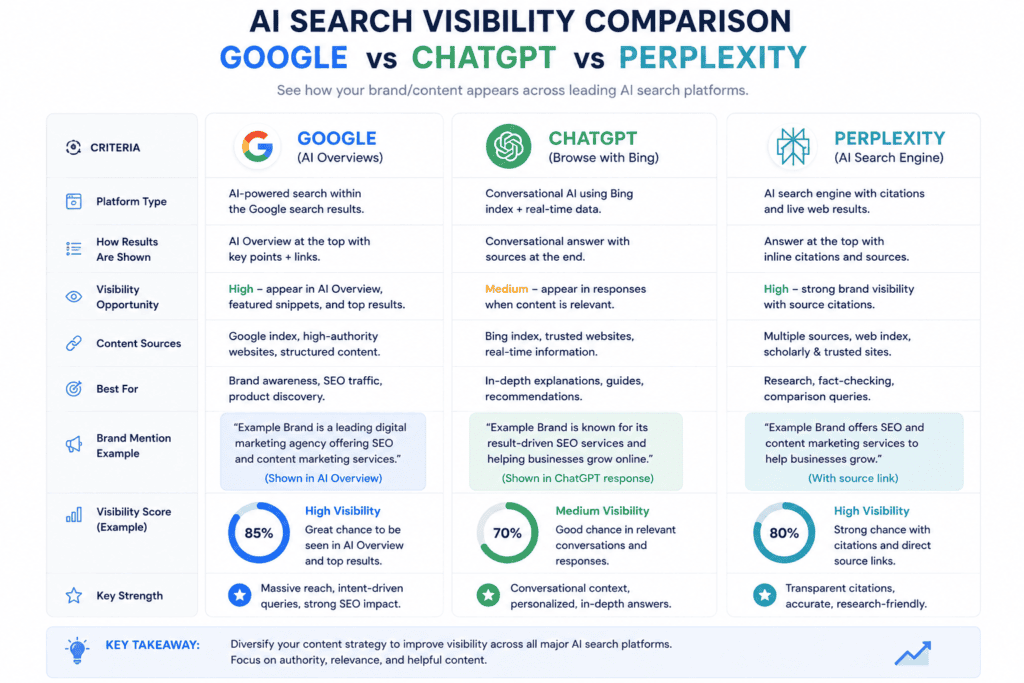
15. ChatGPT / Perplexity (free tiers) — Not traditional SEO tools, but essential in 2026 for testing how your content gets summarised in AI search — a growing share of discovery now happens through AI overviews and answer engines.
Comparison Table: Free SEO Tools at a Glance
| Tool | Best For | Free Limit | Beginner-Friendly |
|---|---|---|---|
| Google Search Console | Site performance data | Unlimited | ⭐⭐⭐⭐⭐ |
| Google Keyword Planner | Keyword volume | Unlimited (needs Ads account) | ⭐⭐⭐⭐ |
| Ahrefs Webmaster Tools | Technical audit | Own domain only | ⭐⭐⭐ |
| Sistrix Smart | Weekly site audit | 1 domain, 1 crawl/week | ⭐⭐⭐⭐⭐ |
| AnswerThePublic | Content ideas | Limited daily searches | ⭐⭐⭐⭐ |
| Ubersuggest | Competitor overview | 3 searches/day | ⭐⭐⭐⭐ |
| RankMath | On-page optimization | Core features free | ⭐⭐⭐⭐⭐ |
| PageSpeed Insights | Site speed | Unlimited | ⭐⭐⭐⭐⭐ |
Pricing Breakdown: What “Free” Really Means
Most tools above are free forever for a single domain, with paid upgrades unlocking competitor analysis, historical data, or more daily searches. Expect this pattern: core function free, competitive intelligence paid. Budget-wise, a beginner can run a complete SEO workflow — audit, keyword research, on-page checks, and rank tracking — at $0/month for the first 6–12 months, which lines up with the typical 3–6 month SEO timeline before organic traffic growth becomes visible.
Beginner SEO Tool Strategy Checklist
- Verify your site in Google Search Console (week 1)
- Connect a Google Ads account for Keyword Planner access (week 1)
- Run a full technical audit with Ahrefs Webmaster Tools or Sistrix (week 1)
- Install RankMath or Yoast and optimize your top 5 pages (week 2)
- Build a content calendar using Answer ThePublic + PAA questions (week 2)
- Check Core Web Vitals with PageSpeed Insights (week 3)
- Test how your best post appears in ChatGPT/Perplexity answers (week 4)
- Track rankings weekly and adjust underperforming pages
On-Page SEO Checklist for Beginners
How to Appear in Google AI Overviews
Common Mistakes Beginners Make With Free SEO Tools
Beginners often collect tools without a workflow — installing five plugins and never opening three of them. Another common mistake is trusting third-party volume estimates over Google’s own Keyword Planner data, which skews strategy toward the wrong keywords. Finally, many skip Core Web Vitals entirely, even though page speed directly affects both rankings and conversion rates.
Pro Tips From the Paknook Team
Pair Google Search Console with RankMath weekly — GSC tells you what’s actually ranking; RankMath tells you what to fix on the page. For AI search visibility, write in clear question-and-answer blocks; AI overviews and answer engines pull structured, direct answers far more often than long narrative paragraphs.
Frequently Asked Questions
What are the best free SEO tools for beginners?
Google Search Console, Google Keyword Planner, Ahrefs Webmaster Tools, RankMath, and Answer The public forms the core beginner stack. Together they cover performance tracking, keyword research, technical audits, on-page optimisation, and content ideation — all without a paid plan.
Do free SEO tools actually work for ranking on Google?
Yes. Free SEO tools for beginners can absolutely get a new site ranking, especially since Google Search Console and Keyword Planner pull data directly from Google itself. The tools don’t rank your site — consistent, useful content combined with the right data does.
How long does SEO take to show results?
Most sites see meaningful organic traffic growth in 3–6 months with consistent publishing and on-page optimisation, though competitive niches can take longer.
Is Ahrefs really free, or is it a trial?
Ahrefs Webmaster Tools is free forever for verified site owners, with no credit card and no automatic upgrade to a paid plan. It’s limited to auditing your own domain, not competitors.
How much does professional SEO help cost if I outgrow free tools?
Costs vary widely by scope, but agencies typically bundle audits, content, and ongoing optimisation into monthly retainers once a site needs competitor-level data the free tools don’t provide.
Conclusion
The 15 best free SEO tools for beginners cover everything you need in 2026: performance data from Google Search Console, real keyword volume from Keyword Planner, technical health from Ahrefs or Sistrix, on-page optimisation from RankMath, and AI search visibility testing through ChatGPT and Perplexity. Start with the three Google tools, add one auditor and one on-page plugin, and you have a complete beginner SEO stack at zero cost.
If you want expert help going beyond free tools — with SEO, content writing, social media marketing, or paid ads — Paknook can help you grow faster. Paknook turns your traffic into real customers. Start today.




2 Comments