Content Strategy Template: A Complete Step-by-Step Framework
A content strategy template is a reusable framework that maps your business goals, audience personas, keyword research, content calendar, and success metrics into one document — so every piece of content you publish serves a clear purpose instead of being created at random.
Most content plans fail for the same reason: there’s no framework connecting why you’re creating content to what you actually publish. A content strategy template fixes that by forcing every blog post, social update, or landing page to answer one question first: does this move the business forward?
Research cited by content marketing platforms consistently finds that the majority of marketers still don’t have a documented content strategy, even though documented strategies are strongly linked to better results. This guide gives you a template you can fill in today, not just a theory lesson.
Quick Summary Box
- A content strategy template ties goals → audience → keywords → calendar → measurement into one system.
- It should be revisited and updated quarterly, not written once and forgotten.
- The best templates include a keyword cluster map, not just a list of blog ideas.
- Pairing a strategy template with a content audit prevents wasted effort on topics that won’t rank.
Table of Contents
What Is a Content Strategy Template?
A content strategy template is a structured document that captures the decisions behind your content — your business goals, who you’re creating content for, what topics and keywords you’ll target, how often you’ll publish, and how you’ll measure success. It’s different from a content calendar, which is just a schedule; a strategy template is the reasoning that decides what goes into that calendar.
Think of it as the blueprint before the building. Skipping it doesn’t save time — it just moves the wasted effort further downstream, into content that never ranks or converts.
Why You Need One (Even as a Solo Creator)
Even a one-person blog benefits from a documented strategy, because it removes the daily “what should I post today?” guesswork and replaces it with a system.
A content strategy template helps you:
- Connect content to actual business outcomes (traffic, leads, sales) instead of vanity metrics
- Avoid duplicate or overlapping topics that compete with each other in search
- Onboard freelancers or team members faster, since the reasoning is written down
- Spot content gaps before a competitor fills them first
The Content Strategy Template: Step by Step
Step 1: Define Your Business Goal (Not Just a Content Goal)
Every section of the template should trace back to one core business objective — more organic traffic, more qualified leads, stronger brand authority, or better customer retention. Write this at the very top of your template in one sentence.
Step 2: Build Your Audience Persona(s)
For each persona, capture:
- Who they are (role, industry, pain points)
- What they’re searching for at each stage of their journey
- Where they consume content (search, social, email, communities)
Step 3: Run a Lightweight Content Audit
If you already publish content, list what exists, what’s ranking, and what’s underperforming. This step alone prevents you from repeating topics you’ve already covered.
Step 4: Do Keyword and Topic Research
Group keywords into clusters around pillar topics rather than treating each keyword as an isolated blog post. Tools like Semrush, Ahrefs, or Google Search Console can surface search volume, related questions, and gaps competitors haven’t filled.

Start by picking one broad pillar topic your business genuinely has authority to speak on. From there, list every related subtopic, question, and long-tail variation you can find — competitor “people also ask” boxes, autocomplete suggestions, and forum threads are all useful raw material. Sort the list into three buckets: the pillar page itself (the broadest, highest-volume term), supporting cluster pages (specific sub-topics that link back to the pillar), and quick-answer posts (narrow, question-based searches that can often be answered in 600–800 words).
This clustering approach does two things a flat keyword list can’t. First, it builds topical authority — search engines increasingly reward sites that cover a subject comprehensively rather than sites with scattered, unrelated posts. Second, it creates a natural internal linking structure, since every cluster page has an obvious anchor point (the pillar) and the pillar has obvious supporting evidence (the cluster pages). When you’re mapping this out in your template, it helps to note not just the keyword itself but its intent — is the searcher trying to learn something, compare options, or take action? That single column can save hours of misdirected writing later.
Don’t ignore keyword difficulty either. Semrush and Ahrefs both surface a difficulty score alongside volume, and Google Search Console’s Performance report will show you which existing pages are already getting impressions for terms you haven’t deliberately targeted yet – often the fastest wins available, since you’re optimising a page Google already partially trusts rather than starting from zero.
Step 5: Map Content to the Buyer Journey

Assign each content idea to a stage: awareness (educational blog posts), consideration (comparisons, how-to guides), or decision (case studies, service pages).
Step 6: Set a Realistic Publishing Cadence
Decide how much content you can genuinely produce at a consistent quality level — one excellent post every two weeks outperforms four rushed ones.
Step 7: Choose Distribution Channels
Note where each piece will be promoted: organic search, email, social platforms, or paid amplification via Google Ads or Meta Ads.
Step 8: Define Your Metrics
Pick 3–5 KPIs tied to your Step 1 goal — organic sessions, keyword rankings, time on page, leads generated, or conversion rate — and track them monthly in Google Analytics or Search Console.
The mistake most templates make here is listing every metric available instead of the few that actually matter for the stated goal. If your Step 1 goal is brand awareness, impressions, organic sessions, and branded search volume matter more than conversion rate. If the goal is lead generation, conversion rate, form completions, and cost-per-lead (where paid channels are involved) matter more than raw traffic. Write the KPI next to the goal it supports in your template so anyone reviewing the document later understands the connection without needing it explained again.
It’s also worth setting a baseline before you start and a realistic time horizon for review — content marketing rarely shows meaningful movement inside four weeks, and judging a new strategy too early is one of the most common reasons businesses abandon a plan just before it starts working. A 90-day baseline-to-review window is a reasonable default for most small businesses and blogs.
Step 9: Review and Update Quarterly
A strategy document that never changes becomes outdated fast. Build a quarterly review into the template itself, not as an afterthought.
Content Strategy Template vs. Content Calendar

| Content Strategy Template | Content Calendar | |
|---|---|---|
| Purpose | Defines why and what to create | Schedules when to publish |
| Frequency of updates | Quarterly or as goals shift | Weekly or monthly |
| Contains | Goals, personas, keyword clusters, KPIs | Dates, titles, authors, publish status |
| Comes first? | Yes — this feeds the calendar | No — built from the strategy |
Common Mistakes to Avoid
- Skipping the business goal and jumping straight to topic ideas
- Treating keywords as a list instead of clusters that build topical authority
- No review cadence, so the strategy silently goes stale
- Chasing vanity metrics like likes or shares instead of goal-linked KPIs
- Publishing without a distribution plan, so good content never gets seen
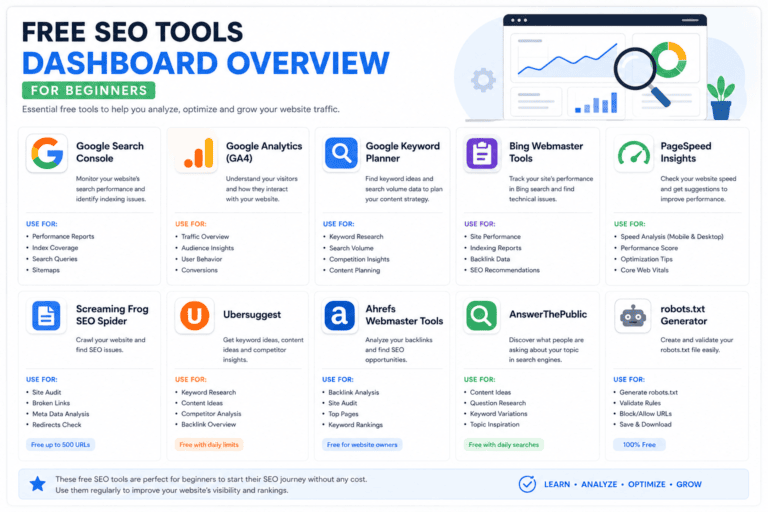
Tools That Make This Easier
- Google Search Console — see what you already rank for and where the gaps are; also the fastest way to spot pages ranking on page two that just need a small optimisation push
- Google Analytics — track traffic and engagement against your KPIs, and segment by landing page to see which content clusters are actually driving results
- Semrush / Ahrefs — keyword research, competitor gap analysis, and backlink tracking for pillar pages that need authority signals
- HubSpot — for teams that want CRM-linked content tracking, useful once content starts feeding a lead pipeline rather than just traffic
- WordPress + RankMath — for on-page optimisation as you publish, including keyword density checks, readability scoring, and schema markup
- A shared spreadsheet or Notion board — sounds basic, but a simple shared tracker of topic, cluster, status, and publish date is often more reliable for small teams than a heavier project management tool, since everyone can see the full picture at a glance
- Canva or Adobe Express – for the featured images and simple infographics each post needs, without requiring a dedicated designer for every piece
Expert Tips
- Start with one pillar topic and 4–6 supporting cluster posts before expanding further — depth beats breadth early on.
- Write the FAQ section of each planned post before the body; it clarifies exactly what the article must answer.
- Revisit old content in your audit before creating anything new — updating a page that already ranks is often faster than starting from zero.
Case Example

A small Pakistan-based travel and lifestyle blog that previously published without any strategy — mixing destination guides, generic tips, and one-off trending topics — saw scattered, inconsistent traffic. After grouping existing posts into clear pillar topics (city guides, food guides, travel tips) and mapping future posts to keyword clusters under each pillar, the site began building topical authority around specific city and food-related searches instead of competing with itself across unrelated topics.
A second, smaller example: a solo freelance writer promoting services through a personal blog had been publishing whatever felt timely each week — a mix of career tips, client stories, and industry news, with no clear thread between posts. After building a one-page content strategy template with a single goal (“attract freelance writing clients through search”), three personas (small business owners, marketing managers, and fellow freelancers), and a keyword cluster around “freelance writing services” and its subtopics, the weekly guessing game disappeared. Every new post idea now gets checked against the template before it’s written — if it doesn’t fit a persona or cluster, it doesn’t get published, which has meant fewer posts overall but each one working harder toward the same goal.
Frequently Asked Questions
What is a content strategy template?
It’s a reusable framework document that connects business goals, audience personas, keyword research, a publishing plan, and measurement — used to guide what content gets created and why.
How is a content strategy different from a content calendar?
A strategy template defines why and what to create; a content calendar simply schedules when each piece goes live. The calendar should always be built from the strategy, not the other way around.
How often should I update my content strategy?
Quarterly is a practical minimum — enough time to see results from published content, but frequent enough to catch shifting goals or market changes.
Do I need a content strategy if I’m a solo blogger?
Yes. Even one-person operations benefit, since it removes daily guesswork and prevents topic overlap or wasted effort on content that won’t rank.
What should be included in a content strategy template?
At minimum: a business goal, audience personas, a content audit, keyword/topic clusters, a buyer-journey map, publishing cadence, distribution channels, and KPIs.
Conclusion
A content strategy template isn’t paperwork — it’s the difference between content that compounds into real search visibility and content that disappears into the noise. Start with the goal, build outward through personas and keyword clusters, and revisit the document every quarter so it keeps working as your business grows.
Need help turning this template into an actual content engine? Paknook helps businesses build and execute content strategies backed by real SEO research, keyword clustering, and measurable results — from content marketing and SEO blog writing to social media marketing, Meta Ads, and Google Ads.